
Blog 14 min read
OPC UA Security in PHP: Policies, Certificates, and Trust
Ten security policies, three trust modes, and the certificate flow between php-opcua and your PLC — from wide-open defaults to production-ready.

Gianfrancesco Aurecchia
@GianfriAur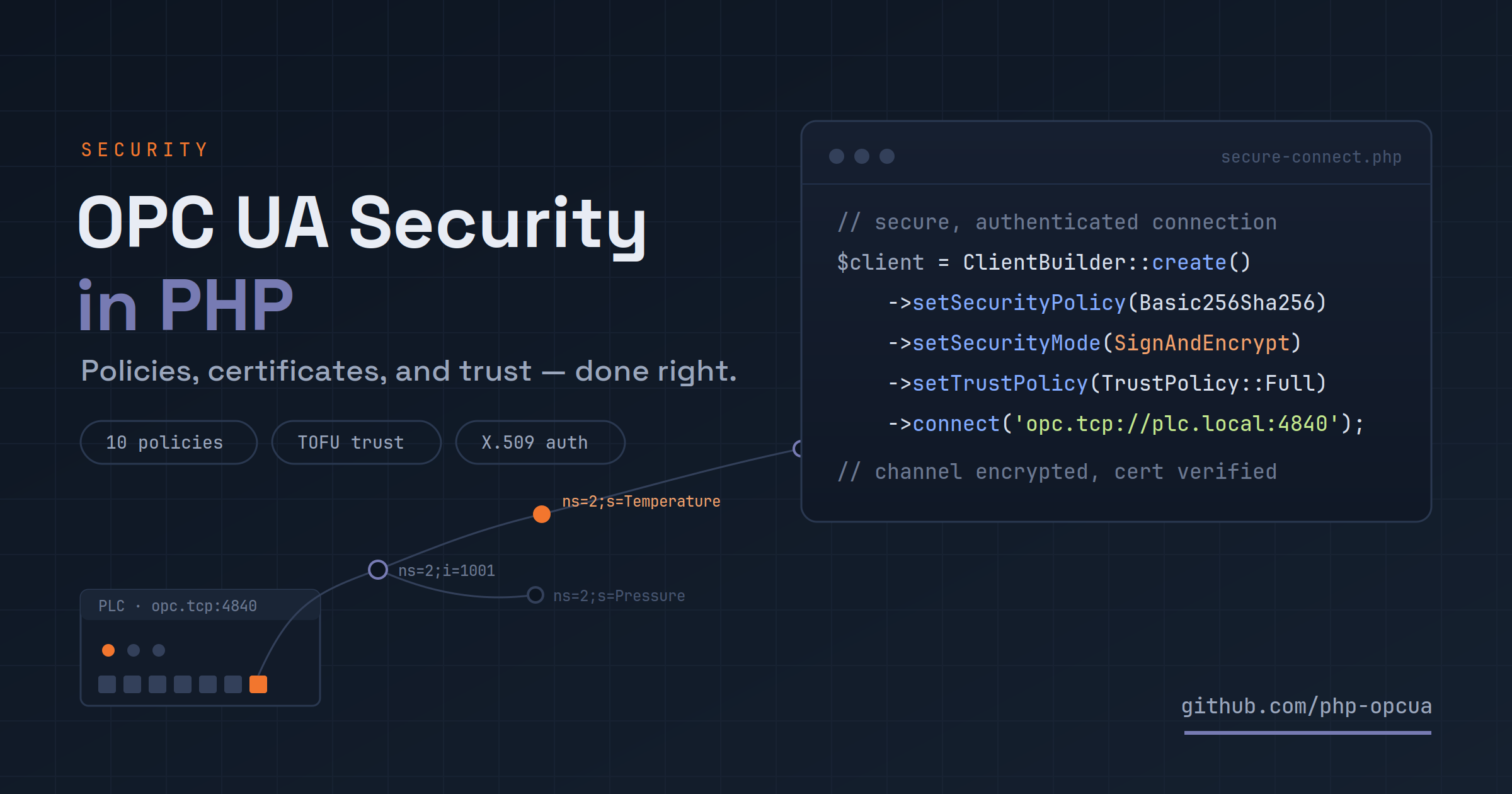
We've already covered why OPC UA needs sessions instead of stateless HTTP calls — sessions answer who is talking to whom, for how long. They say nothing about whether anyone else on the wire can read or rewrite what's being said. That's a different problem, and out of the box php-opcua/opcua-client leaves it wide open: no encryption, no certificate checks, any server's word taken at face value. That's a deliberate default — it's what lets composer require and three lines of code reach a fresh dev server with zero setup — but it's not a configuration to bring anywhere near a real PLC.
This is the other half of connecting safely: the ten security policies the client speaks, where certificates come from, how the client decides whether to trust a server, and the three ways a session can prove who it is.
TL;DR
For most new deployments: SecurityPolicy::Basic256Sha256 + SecurityMode::SignAndEncrypt for the channel, a certificate you generated and control (not the auto-generated fallback), a FileTrustStore with TrustPolicy::FingerprintAndExpiry or Full, and username or X.509 identity for anything that writes. Jump to Wrapping up for the reference table, or keep reading for the reasoning behind each piece.
Two independent decisions: channel and identity
OPC UA security is not one knob, it's two. The first is channel security: how the bytes between client and server are protected in transit — a SecurityPolicy (which algorithms) paired with a SecurityMode (None, Sign, or SignAndEncrypt). The second is authentication: who the session claims to be, carried as an identity token — anonymous, a username and password, or an X.509 certificate.
The two combine freely, which is easy to use well and just as easy to misuse. A backend that only reads published metrics might open a fully encrypted channel and authenticate as anonymous — the data in transit is protected, nobody is impersonating an operator, and that's fine. A client could just as easily open an unencrypted channel and send a username and password over it — the spec allows the combination, this library allows it, and you shouldn't: the password crosses the wire in plain text either way.
Before reaching for an algorithm, it's worth answering a few questions honestly:
-
01
Is the network trusted?
Inside an air-gapped plant LAN,
Nonemight be defensible. Anything crossing a switch you don't control needsSignAndEncrypt— no exceptions, no debate. -
02
Who is the user?
A backend reading published metrics can stay anonymous. An operator issuing writes needs at least a username, ideally a certificate.
-
03
Does the server enforce roles?
If it does, identity is meaningful and credentials must map to the right server-side permissions. If it doesn't, identity is audit-only, and channel encryption is doing the real work.
-
04
Is the server certificate trusted out of band?
If yes, configure fingerprint or full-chain validation. If no, you're on a Trust-On-First-Use posture — covered later in this article.
Here's the full sequence those two decisions play out in, from the first packet to a live session:
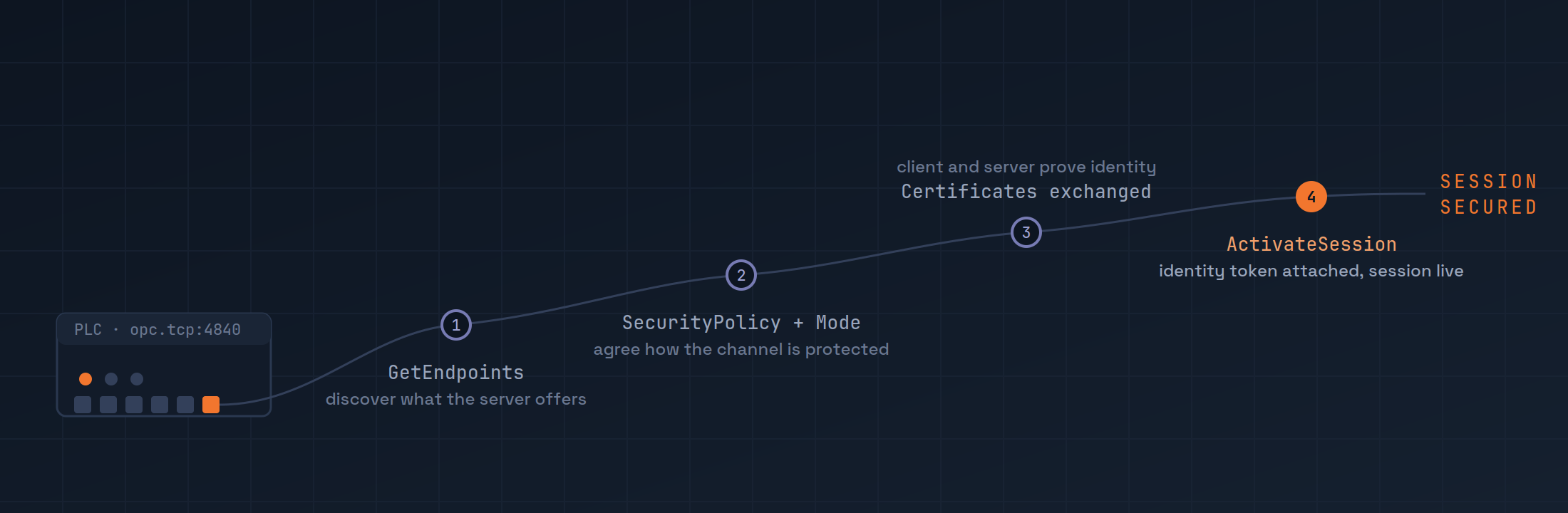
The client discovers what the server offers, the two sides agree on a policy and mode, certificates change hands and get judged, and only then does the session get an identity. The rest of this article follows that order.
Choosing a security policy and mode
SecurityPolicy and SecurityMode are independent enums that combine into one negotiated pair. The mode is the simple half:
| Mode | What it does |
|---|---|
None |
No signing, no encryption |
Sign |
Every message is signed — tampering is detectable, contents are still readable on the wire |
SignAndEncrypt |
Every message is signed and encrypted |
The policy decides which algorithms do that signing and encrypting. php-opcua/opcua-client implements all ten policies defined by the specification: None, five built on RSA, and four newer ones built on elliptic curves.
RSA policies
| Policy | Symmetric cipher | Hash | Status |
|---|---|---|---|
None |
— | — | Dev and throwaway tests only |
Basic128Rsa15 |
AES-128-CBC | SHA-1 | Deprecated — legacy interop only |
Basic256 |
AES-256-CBC | SHA-1 | Deprecated — legacy interop only |
Basic256Sha256 |
AES-256-CBC | SHA-256 | Current default for new deployments |
Aes128Sha256RsaOaep |
AES-128-CBC | SHA-256 | Bandwidth-constrained links |
Aes256Sha256RsaPss |
AES-256-CBC | SHA-256 | Strongest RSA option in the spec |
Basic128Rsa15 and Basic256 carry the OPC Foundation's own deprecated marker: SHA-1 has known collision weaknesses and RSA-1.5 padding has a documented oracle-attack history. They're implemented for one reason — some servers still in the field only speak them.
ECC policies, and why to wait
Four more policies run over elliptic curves instead of RSA: EccNistP256, EccNistP384, EccBrainpoolP256r1, and EccBrainpoolP384r1, pairing NIST or Brainpool curves with AES and SHA-256/384.
ECC is experimental in practice
The implementation is based on the OPC UA 1.05 specification and is tested against UA-.NETStandard, the OPC Foundation's reference implementation — that's the only place it has been validated. As of this writing, no commercial OPC UA server vendor ships ECC endpoints in production firmware; that's a gap across the whole ecosystem, not something specific to this library. Stay on RSA for anything that has to talk to real hardware today.
Picking a pair
A short decision order, in priority:
- If anything between you and the server crosses hardware you don't control, the answer is
SignAndEncrypt. There's no second-best here. - If the server only advertises one policy/mode combination — common with PLC vendors — use whatever
getEndpoints()says it accepts, regardless of what else the spec allows. - If CPU is tight on a small embedded server, AES-128 (
Basic128Rsa15,Aes128Sha256RsaOaep) costs less than AES-256. The cryptographic margin on both is still large; this is a bandwidth/CPU trade, not a security one. - If you're bound by a regulatory framework: Brainpool curves are called out by some European standards, NIST curves are the U.S. federal default — but see the ECC warning above before committing to either against real hardware.
- Otherwise:
Basic256Sha256+SignAndEncrypt. No deprecated primitives, universally supported, the default for a reason.
Configuring the pair is two builder calls plus a certificate:
use PhpOpcua\Client\ClientBuilder;
use PhpOpcua\Client\Security\SecurityPolicy;
use PhpOpcua\Client\Security\SecurityMode;

$client = ClientBuilder::create()
    ->setSecurityPolicy(SecurityPolicy::Basic256Sha256)
    ->setSecurityMode(SecurityMode::SignAndEncrypt)
    ->setClientCertificate('/etc/opcua/client.pem', '/etc/opcua/client.key')
    ->connect('opc.tcp://plc.local:4840');
Anything above None needs a client certificate — which is exactly where the next section picks up. After connect(), the negotiated pair is recoverable from getEndpoints() or by listening for the SecureChannelOpened event, which carries the channel id, policy URI, and mode.
Certificates and trust
Every secured channel involves two X.509 certificates: one proves the client's identity to the server, the other proves the server's identity to the client. Same mechanism, opposite directions, worth handling separately.
The client certificate
Point the builder at PEM files — DER is auto-detected too, though passphrase-protected keys aren't currently supported:
$client = ClientBuilder::create()
    ->setSecurityPolicy(SecurityPolicy::Basic256Sha256)
    ->setSecurityMode(SecurityMode::SignAndEncrypt)
    ->setClientCertificate(
        certPath: '/etc/opcua/client.pem',
        keyPath:  '/etc/opcua/client.key',
        caCertPath: '/etc/opcua/ca.pem',   // optional, for chain validation
    )
    ->connect('opc.tcp://plc.local:4840');
No certificate handy? OpenSSL on the command line covers it end to end:
openssl req -x509 -newkey rsa:2048 -nodes \
    -keyout ca.key -out ca.pem \
    -subj "/CN=opcua-internal-ca" -days 3650

# client certificate signed by that CA
openssl req -new -newkey rsa:2048 -nodes \
    -keyout client.key -out client.csr \
    -subj "/CN=opcua-client/O=integrations"

openssl x509 -req -in client.csr \
    -CA ca.pem -CAkey ca.key -CAcreateserial \
    -out client.pem -days 730 \
    -extfile <(printf '%s\n' \
        "subjectAltName=URI:urn:opcua-client,DNS:opcua.internal" \
        "extendedKeyUsage=clientAuth,serverAuth")
Two extensions matter more than the rest of the flags. subjectAltName: URI has to carry the Application URI the server will check the certificate against — urn:opcua-client is this library's own default, so override it when you generate a real one. And extendedKeyUsage needs both clientAuth and serverAuth, or plenty of servers reject the handshake outright. For ECC, swap the key-generation step for openssl ecparam with a curve matching the chosen policy (prime256v1, secp384r1, brainpoolP256r1, brainpoolP384r1) — a P-256 certificate against an EccNistP384 policy is a configuration error, not a fallback. Certificate identity itself is a SHA-256 fingerprint of the DER bytes, lowercased hex — use that everywhere identity gets logged, never the Common Name or subject string; see RFC 5280 for the X.509 fields behind all of this.
The auto-generated fallback
Configure a non-None policy and skip setClientCertificate(), and the builder quietly generates a self-signed certificate on first connect — 2048-bit RSA or a matching curve, 365-day validity. Genuinely convenient for a one-off script. It's also regenerated on every process restart, which means the fingerprint changes every time, which means the server sees a brand-new, never-seen-before client every time your application boots.
Generate a stable certificate once, deploy it alongside the application, and load it explicitly with setClientCertificate(). Treat the key like any other infrastructure secret — same vault, same rotation discipline as a password.
Rely on the auto-generated fallback past a quick local test. Every restart looks like a new client to the server: audit trails break, role bindings break, trust-store pinning breaks.
Trusting the server certificate
The client receives the server's certificate during discovery. What happens next is the trust store's call — and by default, there isn't one:
| Configuration | Effective behaviour |
|---|---|
setTrustStore(null) — the default |
Any server certificate is accepted |
TrustPolicy::Fingerprint |
The cert's SHA-256 fingerprint must be on file; validity dates ignored |
TrustPolicy::FingerprintAndExpiry |
Fingerprint must match and the cert must be inside its validity window |
TrustPolicy::Full |
Full X.509 chain validation against a CA held in the trust store |
ClientBuilder::setTrustPolicyFileTrustStore is the shipped implementation: DER certificates on disk, one file per certificate, named by fingerprint, split into accepted and refused:
trust/
├── trusted/
│   ├── 2d1f5b8a....der
│   └── a47c80a3....der
└── rejected/
    └── ff03c2a7....der
For a PKI you already run, TrustPolicy::Full plus a CA bundle is the whole job. Without one, pinning by fingerprint is the pragmatic middle ground. And for first contact with a fleet of devices you can't provision one by one, there's Trust-On-First-Use:
ClientBuilder::autoAcceptuse PhpOpcua\Client\TrustStore\FileTrustStore;
use PhpOpcua\Client\TrustStore\TrustPolicy;
$client = ClientBuilder::create()
->setTrustStore(new FileTrustStore('/var/lib/opcua/trust'))
->setTrustPolicy(TrustPolicy::FingerprintAndExpiry)
->autoAccept(true, force: false) // record unknown certs, then enforce
->connect('opc.tcp://plc.local:4840');TOFU trusts the first thing it sees
That's the entire trade-off in the name. If someone is already on the path during that first connection, they can hand the client their own certificate and it gets recorded as legitimate — silently, permanently. Treat autoAccept() as a deployment-time bootstrap: turn it on for the provisioning window, let every device connect once, then turn it back off and let the recorded fingerprints do the enforcing from there.
The same decisions are reachable from the terminal via opcua-cli:
opcua-cli trust opc.tcp://plc.local:4840    # download and trust on the spot
opcua-cli trust:list                         # list everything currently trusted
opcua-cli trust:remove AB:CD:12:34:...       # revoke a fingerprint
Five PSR-14 events fire on every trust decision (ServerCertificateTrusted, ServerCertificateAutoAccepted, ServerCertificateRejected, and two more for manual management) — wiring a listener to record them is the only audit trail of certificate decisions outside the filesystem itself.
Authenticating the session
Channel security and authentication are independent, so the identity token is a separate decision layered on top of whatever policy and mode got picked above. The library supports the three the specification defines:
| Token | Builder call | Typical use |
|---|---|---|
| Anonymous | (default — no call needed) | Service-to-service, read-only telemetry |
| Username / password | setUserCredentials($user, $pass) |
Operators, legacy ACL systems |
| X.509 certificate | setUserCertificate($certPath, $keyPath) |
Hardened service identity, audit-grade |
No builder call required — it's the default. The server's identity-token policy table has to list Anonymous for this to work, or ActivateSession comes back with BadIdentityTokenRejected. Anonymous sessions can typically read anything the server publishes; writes and method calls usually need a real identity, and the client can't tell you which in advance — try the call and read the status code.
$client = ClientBuilder::create()
    ->setSecurityPolicy(SecurityPolicy::Basic256Sha256)
    ->setSecurityMode(SecurityMode::SignAndEncrypt)
    ->connect('opc.tcp://plc.local:4840');
The password is encrypted under the channel's asymmetric keys before it ever leaves the process — the builder takes the cleartext value and handles the encryption transparently underneath.
$client = ClientBuilder::create()
    ->setSecurityPolicy(SecurityPolicy::Basic256Sha256)
    ->setSecurityMode(SecurityMode::SignAndEncrypt)
    ->setUserCredentials('operator', getenv('OPCUA_PASSWORD'))
    ->connect('opc.tcp://plc.local:4840');
Never pair this with a None channel
The spec technically allows a username token over an unencrypted channel, and this library won't stop you — but the password crosses the wire in plain text. If a server's username endpoint doesn't offer at least Sign, that's a vendor bug to file, not a trade-off to accept.
The strongest of the three. Note this is a second, distinct certificate from the one passed to setClientCertificate() — one identifies the application, this one identifies the user behind the session.
$client = ClientBuilder::create()
    ->setSecurityPolicy(SecurityPolicy::Basic256Sha256)
    ->setSecurityMode(SecurityMode::SignAndEncrypt)
    ->setClientCertificate('/etc/opcua/app.pem', '/etc/opcua/app.key')
    ->setUserCertificate(
        certPath: '/etc/opcua/users/ci-bot.pem',
        keyPath:  '/etc/opcua/users/ci-bot.key',
    )
    ->connect('opc.tcp://plc.local:4840');
Some servers accept the same certificate for both roles; some reject it outright. The conservative default is two certificates with two distinct subjects, issued by the same internal CA.
One more wrinkle worth knowing about. Each identity token a server advertises comes with a policyId string, and outside a handful of conventions ("anonymous", "username", "certificate") there's no real standard for what that string is — open62541 and several PLC vendors publish their own. Automatic discovery of these IDs
Changed in
v4.3.1
now covers all three token types; earlier releases only discovered the anonymous one and hardcoded the rest, which is worth checking if you're running an older version against a non-standard server.
When authentication fails
| Status | Usual cause |
|---|---|
BadIdentityTokenInvalid |
Token shape rejected — often a non-standard policyId |
BadIdentityTokenRejected |
Server doesn't accept this identity type on this endpoint |
BadUserAccessDenied |
Wrong password, or the certificate isn't in the server's user trust store |
BadCertificateUntrusted |
User certificate rejected by the server |
BadCertificateTimeInvalid |
User certificate has expired |
All five surface from ActivateSession as a ServiceException carrying the status code — the same shape as the channel-negotiation failures from the policy section above.
Wrapping up
One table, collapsing everything above into the decision you actually have to make:
| Situation | Policy + mode | Identity |
|---|---|---|
| Local dev, throwaway server | None / None |
Anonymous |
| Legacy server, integrity only | Basic256Sha256 / Sign |
Username |
| New deployment, default choice | Basic256Sha256 / SignAndEncrypt |
Username or X.509 |
| Hardened production | Aes256Sha256RsaPss / SignAndEncrypt |
X.509 |
Two things worth flagging that didn't fit neatly into a section above. First, the defaults are deliberately wide open — None policy, no trust store — specifically so a fresh composer require works against a fresh dev server with zero configuration. That's exactly backwards for anything production-facing, and dialing it in is on you, explicitly, every time. Second, if browse or metadata results are going through a PSR-16 cache, this library no longer calls unserialize() on cached values — payloads pass through a JSON-only codec gated by a type allowlist, which matters if that cache is writable by anything other than the client itself. See Cache path hardening for the detail.
Keep reading
Where to go for more depth than one article can carry.
The Security section of the docs goes further on every axis covered here — the complete trust-store API, every certificate validity rule, and the full cipher table for all ten policies. And if sessions themselves are still the fuzzy part underneath all of this, the sessions vs. HTTP APIs article covers the layer this one builds on.
Keep reading
OPC UA sessions vs HTTP API calls, explained for PHP devs
OPC UA sessions vs HTTP API calls, explained for PHP devs
OPC UA Subscriptions in Laravel: Build a Live Machine Dashboard
Build a live machine dashboard in Laravel with OPC UA subscriptions: a session-manager daemon streams PLC values into cache while Livewire keeps the UI fresh.
php-opcua v4.6.0: Self-Healing Sessions Survive Restarts
php-opcua v4.6.0 makes sessions self-healing across reconnects and process restarts, adds data-change filters, and richer subscription diagnostics.